What WSO2 Integrator 5.0 Changes for Integration Teams
WSO2 Integrator 5.0 is more than a version bump. It consolidates the BI, MI and SI profiles into a single offering, according to WSO2’s release notes, and adds several capabilities that change how integration teams work:
Conversational Copilot. You describe a requirement, refine a proposed plan over several exchanges, and the Copilot generates the integration and its visual diagram.
Integration Control Plane (ICP). One dashboard to start and stop integrations, read logs and metrics, and manage access with project- and environment-scoped roles and SSO.
Sturdier file processing and connectivity. Single-node file coordination with failover, fail-safe CSV handling, native Solace PubSub+ support and wider change data capture.
AI governance. An LLM evaluation framework and agent execution visualizer for AI-driven flows.
If your estate runs on Micro Integrator, nothing breaks: the MI profile continues as WSO2 Integrator: MI 4.6.0. Our advice is to keep stable MI integrations where they are, and use 5.0 for new APIs and event-driven work where its typed, code-backed model pays off fastest.
Still running WSO2 Enterprise Integrator 6.x or 7.x? Version 5.0 is a good moment to plan the move. Start with an inventory of what each integration actually does, retire what is no longer needed, and rebuild the rest where the new model adds value, rather than converting old artifacts one by one.
What You Will Build
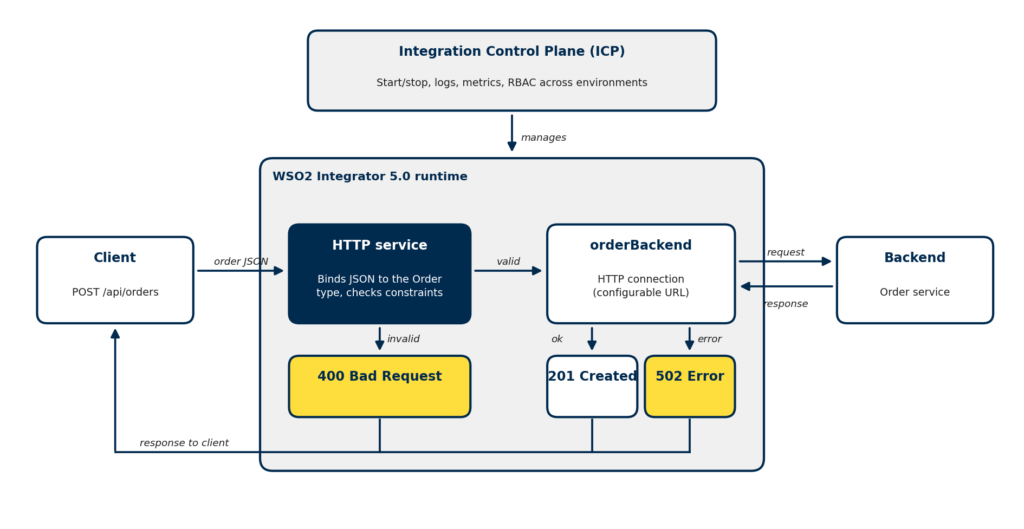
You will build an order API that accepts an order, validates it, forwards valid orders to a backend order service, and returns a clear, predictable response for every outcome.
Figure 1: The order API flow, with one clear response for each outcome.
What you need: WSO2 Integrator 5.0.0 with the WSO2 Integrator IDE (see the install guide), curl or Postman, and internet access to the sample backend. We use JSONPlaceholder, a free fake REST API, so you can follow along without your own backend.
Build the Order API in WSO2 Integrator 5.0, Step by Step
Step 1: Create the Integration
Open WSO2 Integrator, select Create New Integration, set the integration name to orderIntegration and the project name to order-integration, and select Create Integration. The project keeps the integration, its configuration and its tests together, so it builds and deploys as one unit.
Step 2: Add an HTTP Service
Select + Add Artifact, then HTTP Service under Integration as API. Keep the service contract as Design From Scratch, set the base path to /api and select Create. The service listens on port 9090 by default.
Step 3: Add a POST Resource with a Typed Payload
In the service designer, select + Add Resource, choose POST and set the resource path to orders. This gives you POST /api/orders. We prefer a resource named after the noun rather than a verb such as /orders/create: the HTTP method already says what is happening.
Define the request payload as an Order type with four fields: orderId, customerId, product and quantity.
Let the Type System Do the Validation
This is where WSO2 Integrator 5.0 differs from flow-only tools. Under the visual designer sits Ballerina code, and Ballerina binds the incoming JSON to your Order type automatically. A missing field or a string where a number belongs is rejected with 400 Bad Request before your flow runs. Add constraint annotations to the type, such as a minimum value of 1 for quantity, and those rules are checked during binding as well. You get validation for every field without building and maintaining a single branch in the flow.
Step 4: Add a Configurable Backend Connection
Inside the resource flow, select +, then Add Connection, then HTTP. Name the connection orderBackend. Instead of typing the URL into the connection, point it at a configurable variable called backendUrl. The same build can then target development, test and production backends.
Step 5: Call the Backend and Handle Failure
Add a call to orderBackend: a POST to /posts with the validated order as the body, stored in backendResponse. Then add a branch for the case where the call returns an error, and return 502 Bad Gateway with a short, safe message. A backend outage is not the client’s fault, and the response should say so without exposing internal detail.
Step 6: Review the Generated Code
Switch to the code view. The designer produces Ballerina along these lines (tidied for readability):
final http:Client orderBackend = check new (backendUrl);
service /api on new http:Listener(9090) {
resource function post orders(Order newOrder) returns json|http:BadGateway { json|error backendResponse = orderBackend->post("/posts", newOrder); if backendResponse is error { return <http:BadGateway>{ body: {status: "ERROR", message: "Order service is unavailable. Please try again later."} }; } return backendResponse; } }
Notice what you did not have to write. Validation lives in the type, a POST resource that returns a payload responds with 201 Created by default, and the error path is a typed return value. Because the flow is real code, it goes into version control and code review like any other service. For more patterns, see HTTP data binding in Ballerina.
Step 7: Run and Test
Select Run, then send a valid and an invalid order:
# Valid order: expect 201 Created curl -i -X POST http://localhost:9090/api/orders \ -H "Content-Type: application/json" \ -d '{"orderId":"ORD-1001","customerId":"CUST-501","product":"Laptop","quantity":2}'
# Invalid quantity: expect 400 Bad Request, backend never called curl -i -X POST http://localhost:9090/api/orders \ -H "Content-Type: application/json" \ -d '{"orderId":"ORD-1002","customerId":"CUST-501","product":"Laptop","quantity":0}'
The first call should return 201 Created with the backend’s response. The second should return 400 Bad Request naming the quantity constraint, and the backend is never called. To test the failure path, set backendUrl to an unreachable host and repeat the valid call: you should get the 502 response.
Secure the Integration Before It Leaves Your Laptop
The tutorial runs over plain HTTP. Before you deploy, close these gaps:
Keep configuration out of the code. Supply backendUrl, credentials and API keys through a Config.toml per environment, mounted from your secrets manager rather than committed to Git:
# Config.toml (one per environment, never committed with real values) backendUrl = "https://orders.internal.example.com"
Use TLS on both sides. Configure the HTTP listener with a certificate and key, and call backends over HTTPS.
Put an API gateway in front. Expose the service through WSO2 API Manager for authentication and rate limiting, rather than publishing the runtime directly.
Restrict the network. Allow only approved callers in, only required backends out, and keep ICP and other admin interfaces off the public internet.
Run WSO2 Integrator 5.0 in Production
Run at least two instances behind a load balancer, and let the Integration Control Plane give operators one view of health, logs and metrics across environments, with role-based access and SSO. Size capacity with load tests that mirror your real payloads and backend latency, not with published benchmarks alone. Turn on metrics and tracing from day one, so you can see where time is spent in each flow when something slows down.
Monitor request volume, latency, 4xx and 5xx rates and backend failures. A rising 400 rate usually means a client is sending bad data, which is a conversation with that client. A rising 502 rate means a backend is struggling, which is an incident. Log enough to trace a failed order, but never full payloads containing personal data.
Use the Copilot to Go Faster, Not to Skip Review
The 5.0 Copilot can turn a well-written requirement into a working integration in minutes, and that is genuinely useful for scaffolding. Treat its output like a pull request from a new team member: check the types, the error paths and the configuration before anything reaches production. The patterns in this guide make a good review checklist.