Why Error Handling Makes or Breaks a WSO2 MI Integration
Most integration incidents we are called in to fix do not start with a broken backend. They start with an integration that had no plan for one. A service restarts, the API hands a raw connection error to a partner, and a message that should have been queued is gone.
This guide shows how Tellestia's WSO2 team builds error handling into WSO2 Integrator: MI 4.6 (formerly WSO2 Micro Integrator) from day one: fault sequences that fail cleanly, retries that fire only when they should, and asynchronous delivery that keeps messages from disappearing.
What you need: WSO2 Integrator: MI 4.6.0, JDK 21 or 25, MI for VS Code, curl or Postman, and MySQL or PostgreSQL for the message store. See WSO2’s installation prerequisites for sizing and tested platforms.
How Errors Flow Through WSO2 MI: Retry First, Fault Sequence Last
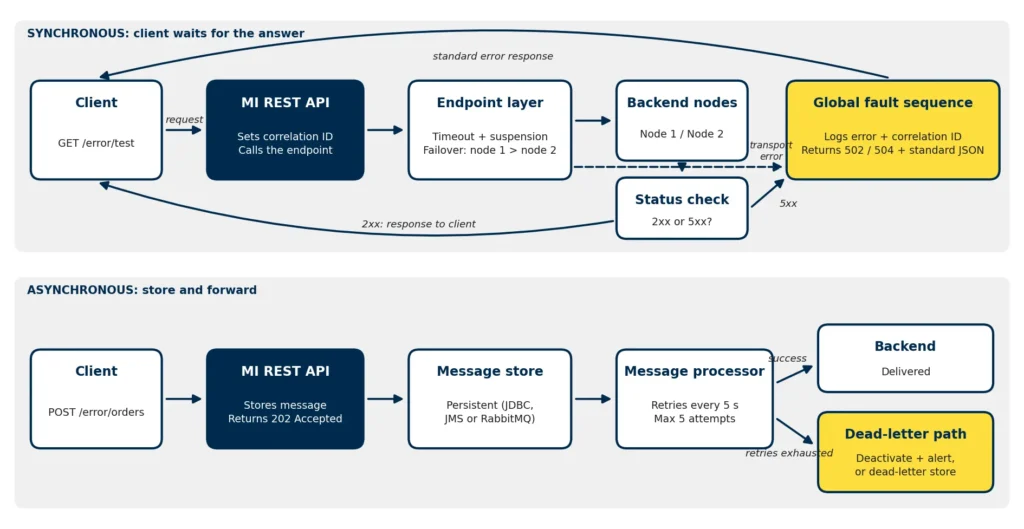
Figure 1: How WSO2 MI handles synchronous and asynchronous failures
Think of error handling as layers, each handling one kind of failure:
Endpoint settings control timeouts and suspension.
Failover or store and forward absorbs transient failures.
A status check catches HTTP error responses.
The fault sequence logs the detail and returns a clean error.
A message store and processor protect work that must not be lost.
When something fails, MI sets ERROR_CODE, ERROR_MESSAGE, ERROR_DETAIL and ERROR_EXCEPTION on the message context for the fault sequence to use.
Build a Fault-Tolerant REST API, Step by Step
Step 1: Create the Backend Endpoint
In MI for VS Code, create an integration project with a REST API named errorHandlingAPI (context /error, resource /test, method GET). Then create an endpoint named backendEndpoint for a backend at http://localhost:8080/backend:
<endpoint name="backendEndpoint" xmlns="http://ws.apache.org/ns/synapse"> <address uri="http://localhost:8080/backend"> <timeout> <duration>30000</duration> <responseAction>fault</responseAction> </timeout> <!-- Single backend, no failover partner: switch off suspension --> <suspendOnFailure> <errorCodes>-1</errorCodes> <initialDuration>0</initialDuration> <progressionFactor>1.0</progressionFactor> <maximumDuration>0</maximumDuration> </suspendOnFailure> <markForSuspension> <errorCodes>-1</errorCodes> </markForSuspension> </address> </endpoint>
Why We Switch Off Suspension Here
By default, MI suspends an endpoint after an error and rejects calls to it without trying the backend. With a single backend, one restart can keep your API failing long after the backend has recovered. With no failover partner, we switch suspension off and let the timeout and fault sequence do the work. In a failover group, keep it on so MI routes around the failed node.
Step 2: Create the API and Check Backend Status Codes
<api name="errorHandlingAPI" context="/error" xmlns="http://ws.apache.org/ns/synapse"> <resource methods="GET" uri-template="/test"> <inSequence> <!-- Reuse the caller's correlation ID, or fall back to MI's message ID --> <property name="correlationId" expression="get-property('transport','X-Correlation-ID')"/> <filter xpath="string-length(get-property('correlationId')) = 0"> <then> <property name="correlationId" expression="get-property('MessageID')"/> </then> <else/> </filter> <call> <endpoint key="backendEndpoint"/> </call> <!-- MI treats HTTP error responses as normal responses --> <filter source="get-property('axis2','HTTP_SC')" regex="5\d\d"> <then> <property name="ERROR_CODE" value="BACKEND_HTTP_5XX"/> <property name="ERROR_MESSAGE" expression="concat('Backend returned HTTP ', get-property('axis2','HTTP_SC'))"/> <sequence key="globalFaultSequence"/> </then> <else> <respond/> </else> </filter> </inSequence> <faultSequence> <sequence key="globalFaultSequence"/> </faultSequence> </resource> </api>
The fault sequence catches transport errors such as a refused connection or a timeout. The status filter covers the gap most tutorials miss: when a backend returns HTTP 500, MI has received a valid response, so the fault sequence never runs. Without the filter, that 500 and its body, possibly including stack traces or internal hostnames, go straight back to your client. Client errors (4xx) pass through because the caller usually has to fix the request.
Step 3: Create the Global Fault Sequence
This reusable sequence logs the error with the correlation ID, maps the failure to the right status code, and returns a safe, consistent JSON error:
We return 502 or 504 rather than 500 because the failure happened upstream. A 500 tells the client that MI itself broke.
Step 4: Test It
Deploy the project, stop the backend and run curl http://localhost:8290/error/test. You should get a 502 with the JSON error above and a matching ERROR entry in the MI log. Add -H "X-Correlation-ID: test-123" and the same ID appears in both.
Restart the backend and the next call succeeds immediately. Repeat with default suspension settings and calls keep failing for a while after the backend is back. That is the behavior that catches teams out in production.
Retries in WSO2 MI: What Works and When to Avoid Them
Some failures clear within seconds, so a second attempt often succeeds. But be precise about what MI does: a standalone address endpoint does not resend a failed request. The retryConfig element in WSO2 examples controls which error codes a failover or load-balance group retries, so on its own it adds no retries. You have two reliable options:
Failover for synchronous calls with more than one backend node. Wrap two address endpoints in a failover endpoint and MI tries the next node as soon as one fails. Here suspension helps, sidelining the failed node until it recovers.
Store and forward for work that can be processed in the background, covered below.
Transient vs Permanent Errors
Never retry every error by default. Classify failures first.
Retry These: Connection failures, timeouts, service restarts, and HTTP 503 or 429 responses (respecting any Retry-After header).
Fail Fast on These: Invalid requests, authentication failures and business validation errors. Retrying an invalid access token just returns the same 401 again and again.
Only Retry What Is Safe to Repeat
A retry is safe only when sending the same request twice has the same effect as sending it once. GET, PUT and DELETE are designed to be idempotent. POST usually is not. If a POST times out, the backend may already have created the order, and a retry creates a second one. For non-idempotent operations, have the backend accept an idempotency key, such as a unique request ID in a header, and ignore duplicates before you enable any retry.
A Standard Error Contract That Exposes Nothing Internal
Every API should return errors in the same shape, and enforcing that is part of good API governance. We recommend three fields at minimum: a stable code clients can act on, a short human-readable message, and a correlationId that links the response to your logs. Point every API at the same globalFaultSequence so the contract cannot drift. Never return ERROR_MESSAGE or a backend’s raw error body to an external client. A response such as "Connection refused to 10.10.10.25:8080" tells an attacker which internal host and port you use. Keep technical detail in the logs, and ask clients to quote the correlationId in support tickets.
Guaranteed Delivery with Message Stores and Processors
Some work, such as an order feed or a partner EDI acknowledgment, does not need an immediate answer. Accept the message, return 202 Accepted, store it, and deliver it in the background.
Set Up a Persistent Store and a Forwarding Processor
Use a persistent message store (JDBC, JMS or RabbitMQ), never in-memory, then add a forwarding processor with bounded retries:
This retries every five seconds, up to five times. With max.delivery.drop disabled, the processor deactivates after the last attempt instead of discarding the message, preserving order and triggering an alert. When order does not matter, route exhausted messages to a dead-letter store instead so the queue keeps moving. Either way, silent loss is the one outcome you cannot accept.
Error Handling Across a Clustered WSO2 MI Deployment
With several MI nodes, use a shared, persistent message store so a node failure does not take queued work with it. Enable MI’s cluster coordination so each message processor runs on one node at a time. Without it, a processor runs on every node, which can deliver messages out of order or twice. Centralize logs with the correlation ID so you can follow one request across nodes.
Production Logging That Speeds Up Root-Cause Analysis
A good failure log answers which integration failed, why, and for which request. The fault sequence above logs all three. Alert on rates rather than single errors: a rise in 101503 or 101504 errors on one endpoint is an early warning that a backend is struggling. Never log passwords, tokens, API keys or confidential payloads.
Get Expert Help with WSO2 Integrator: MI
Tellestia’s WSO2 Enterprise Integration team designs, builds and supports WSO2 integrations for enterprises. If you run MI in production or are planning a move to MI 4.6, book a WSO2 integration health check and we will review your error handling, endpoints and deployment against the practices in this guide. Prefer to hand over day-to-day operations? Explore our WSO2 Managed Services.