Why File-to-Database Integration Still Breaks in Production
Spreadsheets and CSV exports remain the most common way business data moves between teams and partners, and they are also where data quality problems start. In our projects, the failures are rarely about reading a file. They come from what happens next: a blank customer ID that loads anyway, a rerun that doubles every row, or a bad record that stops a 50,000-row batch at row 49,999.
This guide shows how Tellestia’s WSO2 integration team builds file-to-database integrations in WSO2 Integrator 5.0 so they survive real data. You will load customer records from a CSV file and an Excel workbook into MySQL, with validation, safe writes and replayable errors.
What You Need Before You Start
WSO2 Integrator 5.0.0 with its IDE
MySQL 8.0.19 or later, with a customers table whose customer_id column is the primary key
A sample customers.csv and a customers.xlsx with a sheet named Customers, both with the headers customerId, name, email and country
How the Integration Works
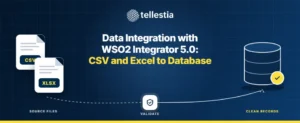
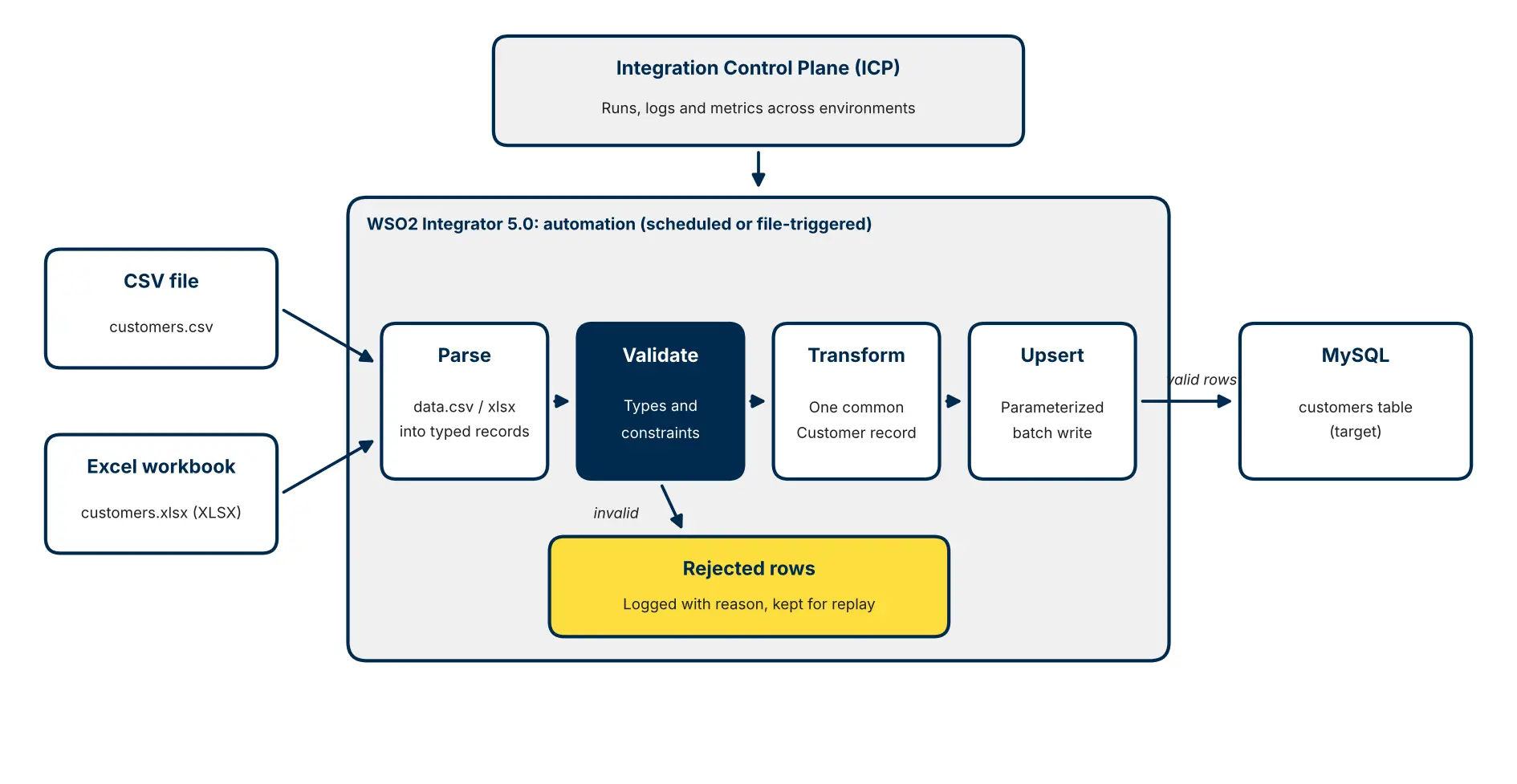
Figure 1: One typed record, four stages, and a clear path for every rejected row.
An automation, run on a schedule or triggered by a new file, reads both sources into the same Customer record. Rows that pass validation are written to MySQL in one batch. Rows that fail are logged with a reason so someone can fix and replay them, and the Integration Control Plane gives operators one view of runs, logs and metrics.
Choosing the Right Trigger
How a load starts matters as much as how it runs. Use a schedule when files arrive at predictable times, such as a nightly export. Use a file or SFTP listener when partners drop files whenever they are ready, so data lands within minutes rather than overnight. Expose the same logic as an API when a user or another system needs to start a load on demand. Keeping the processing logic separate from the trigger lets you change one without rewriting the other.
Build the CSV and Excel Loader in WSO2 Integrator 5.0
Step 1: Create the Project and an Automation
In WSO2 Integrator, create an integration project and add an Automation as the entry point. An automation suits batch work: it runs on a schedule or on demand, rather than waiting for an HTTP request. If you are new to the 5.0 designer, start with our WSO2 Integrator 5.0 tutorial.
Step 2: Model the Data Once as a Typed Record
Define a single Customer type that every source maps into. This is the most important design decision in the whole integration: validation, transformation and the database write all work against one contract, whatever the source format.
The constraint annotations turn business rules into code, so a blank ID or an obviously invalid email can be caught before it reaches the database.
Step 3: Read the CSV File
WSO2 Integrator parses delimited files into typed records with the ballerina/data.csv module. Headers map to record fields automatically, and type mismatches fail with a clear error. For large files, read the file as a stream instead of loading it whole, so memory use stays flat regardless of file size. The CSV and flat file guide covers delimiters, headerless files and streaming.
Step 4: Read the Excel Workbook
For Excel, the ballerina/xlsx module binds rows from an XLSX sheet to the same Customer record. One limitation matters for production design: the module loads each workbook fully into memory and has no row-streaming API. Cap workbook size, or ask the source system for CSV when volumes are large.
Step 5: Validate and Route Bad Rows
Validate each record and decide what a failure means. For most business files, we skip the bad row, log it with its ID and the reason, and keep loading the rest. Stopping the whole batch for one typo usually costs more than it protects. Write rejects to an error file or table if business users need to correct and resubmit them.
Step 6: Upsert into the Database Safely
Write with parameterized queries, never string-built SQL, so data from a file can never become an injection. Use an upsert keyed on customer_id, so loading the same file twice updates rows instead of duplicating them. Send rows as one batch, and wrap the write in a transaction when the business needs all-or-nothing loads.
When Source Columns Do Not Match
Real files rarely share one layout. When a partner sends cust_no instead of customerId, or splits a name across two columns, define a record for that source and map it to Customer with the visual data mapper. The mapping stays visible and reviewable, and the rest of the pipeline never has to change.
Step 7: Review the Complete Code
Put together, the integration is short enough to review in one sitting (tidied for readability):
final mysql:Client db = check new (host = dbHost, user = dbUser, password = dbPassword, database = dbName);
public function main() returns error? { // 1. Parse both sources into the same typed record Customer[] fromCsv = check csv:parseBytes(check io:fileReadBytes(csvPath)); Customer[] fromXlsx = check xlsx:parseSheet(xlsxPath, "Customers");
// 2. Validate every row; log and skip the ones that fail Customer[] valid = []; foreach Customer c in [...fromCsv, ...fromXlsx] { Customer|constraint:Error checked = constraint:validate(c); if checked is constraint:Error { log:printWarn("Rejected row", customerId = c.customerId, reason = checked.message()); continue; } valid.push(checked); }
// 3. Upsert with parameterized queries, so reruns never duplicate rows if valid.length() > 0 { sql:ParameterizedQuery[] upserts = from Customer c in valid select `INSERT INTO customers (customer_id, name, email, country) VALUES (${c.customerId}, ${c.name}, ${c.email}, ${c.country}) AS new ON DUPLICATE KEY UPDATE name = new.name, email = new.email, country = new.country`; _ = check db->batchExecute(upserts); } log:printInfo("Load complete", received = fromCsv.length() + fromXlsx.length(), loaded = valid.length()); }
Credentials come from configurable values, supplied through a Config.toml per environment and kept out of source control.
Test It Like Production Data
A loader that only passes the happy path is not finished. Run these cases before deploying:
Test
Input
Expected result
Happy path
Valid CSV and XLSX files
All rows loaded; counts match the source files
Rerun
Same files loaded twice
No duplicate rows; existing rows updated
Bad rows
Blank customerId, short email
Rows logged with a reason and skipped; the rest load
Wrong types
Text in a numeric column
Parse error naming the column, or row skipped in fail-safe mode
Missing file
Path that does not exist
Clear error; nothing written to the database
Database down
Database unreachable
Run fails cleanly and can be rerun safely
Secure the Data Pipeline
Least privilege. Give the integration a database account that can only insert and update the tables it loads.
Secrets. Keep credentials in configuration backed by your secrets manager, never in the project.
Transport. Use TLS for database connections, and SFTP rather than shared folders for partner files.
Logs. Log record IDs and reasons, never full rows that contain personal data.
Run File Integrations in Production
One run at a time. When several instances watch the same files, make sure only one processes each file. WSO2 Integrator 5.0 adds single-node file coordination with failover for this.
Replay without duplicates. Upserts make reruns safe, so a failed batch can simply be rerun after the cause is fixed.
Watch the numbers. Track rows received, loaded and rejected per run. A sudden jump in rejects usually means the source format changed.
Plan for growth. Stream large CSV files and tune connection pools before adding concurrency.
WSO2 Integrator or a Dedicated ETL Tool?
This pattern is a strong fit when files feed operational systems: a CRM, an ERP or an order database, where each record must be validated and errors must reach a person quickly. For heavy analytical loads into a data warehouse, with complex joins across many sources and historical reprocessing, a dedicated ELT or data platform is usually the better home. Many of our clients run both, with WSO2 Integrator handling operational data flows and the warehouse handling analytics. The key is choosing per use case, not per vendor.
Yes. The ballerina/xlsx module reads and writes XLSX workbooks and binds rows to typed records. It loads each workbook into memory, so plan for file size.
2. How do I stop duplicate records when a file is loaded twice?
Upsert on a business key, such as customer_id, instead of a plain insert. Reruns then update existing rows.
3. How large a CSV file can WSO2 Integrator handle?
Streamed CSV parsing keeps memory use flat regardless of file size, so the practical limit is processing time and database throughput.
Resmi R.V
Senior Engineer
Share Blog Via:
Ballerina
Data Integration
WSO2 Integrator
Related Blogs
WSO2
October 19, 2026
WSO2 Integrator 5.0 Tutorial: Build a Validated Order API the Production Way
What WSO2 Integrator 5.0 changes for integration teams, and a hands-on build of a validated...