What’s New in WSO2 API Manager 4.7, and Why It Matters
Most API Manager upgrades we run for clients are routine. Version 4.7 deserves more attention, because several defaults change in ways that affect security reviews and existing automation. The headline changes from the release notes:
A choice of gateways. The control plane can now drive the new API Platform Gateway, built on Envoy with HTTP/2 and HTTP/3 support, alongside the classic Gateway, according to WSO2’s 4.7 announcement.
Java 21 or 25 only. Earlier JDKs will not run 4.7, so upgrades start with the runtime.
Safer defaults. Symmetric encryption, default-deny access to control plane resources, API keys bound to a specific API, and token persistence switched off.
AI-ready APIs. MCP governance and analytics, plus multi-model routing for AI APIs.
What You Need Before You Start
WSO2 API Manager 4.7.0 all-in-one distribution and JDK 21 or 25
A test backend that exposes a REST endpoint, plus curl or Postman
A machine with at least 4 GB RAM and 2 CPU cores for evaluation; size production from load tests, not defaults
Ports 9443 (portals and token endpoint) and 8243 (Gateway HTTPS) available locally
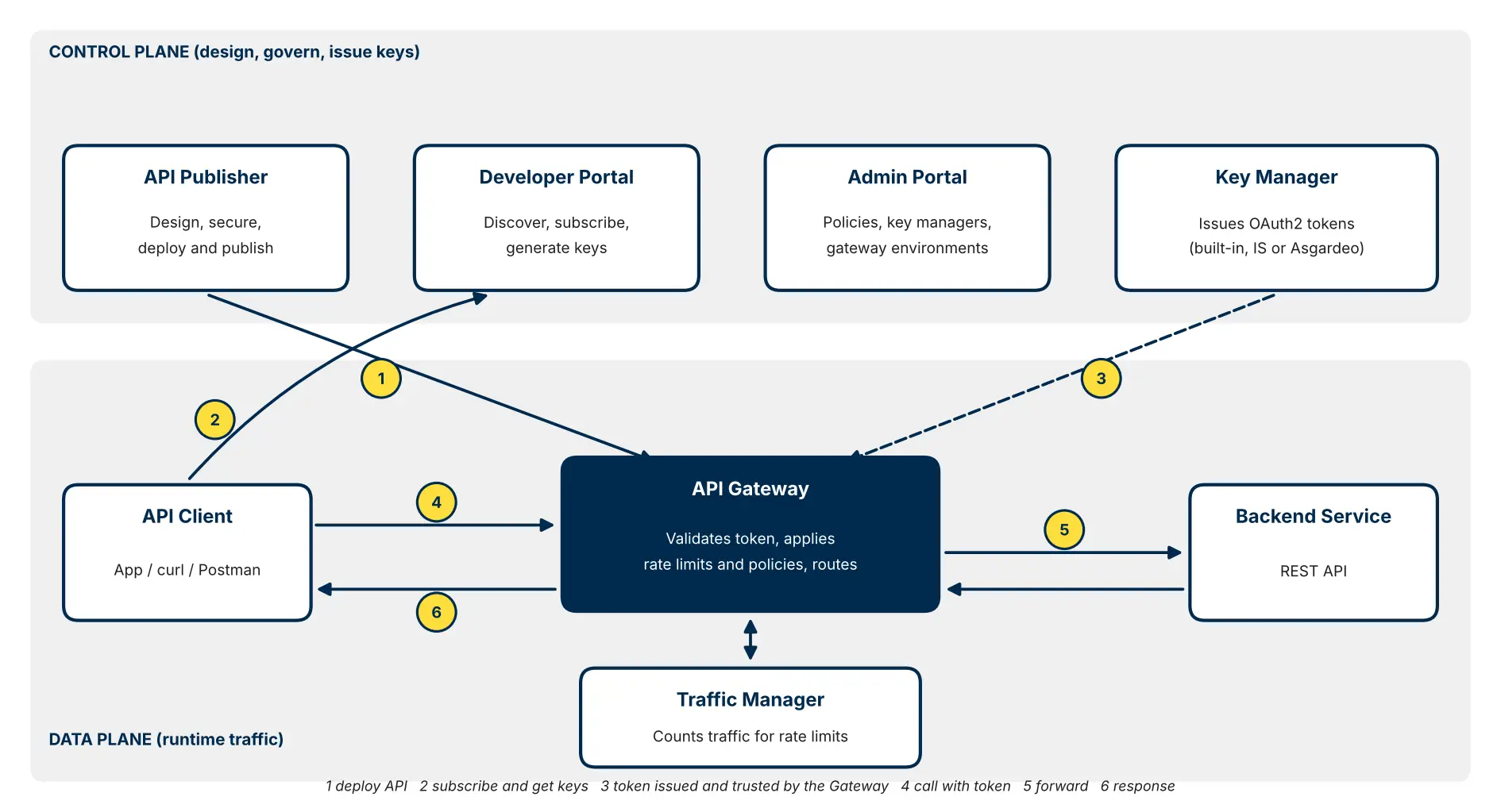
How WSO2 API Manager 4.7 Fits Together
Figure 1: The control plane designs and governs APIs; the Gateway enforces them on every call.
Everything runs in one process in the all-in-one distribution used here. In production, 4.7 also ships the control plane, a Universal (classic) Gateway and the Traffic Manager as separate distributions, so you can scale the Gateway independently.
Issues OAuth2 tokens; built-in, WSO2 Identity Server or Asgardeo
Steps 5 and 6
API Gateway
Validates tokens, enforces policies and routes traffic
Step 6
Traffic Manager
Counts traffic and coordinates rate limits across gateways
Production
Publish Your First API on WSO2 API Manager 4.7, Step by Step
Step 1: Set the Encryption Key, Then Start the Server
In 4.7, sensitive data is encrypted with a symmetric AES-256 key by default. If you start the server without one, it generates a random key and warns you, and replacing it later means running a key rotation. So set your own key before the very first start, as described in WSO2’s symmetric encryption guide:
Keep this key in your secrets store and back it up. Every node in a cluster must use exactly the same key. Then point JAVA_HOME at JDK 21 or 25 and start the server from the bin directory. The portals open at https://localhost:9443/publisher and https://localhost:9443/devportal.
Step 2: Create the API in the Publisher
In the Publisher, choose Create API, then Start From Scratch, or import an OpenAPI definition if you have one. We recommend importing a definition whenever one exists: the contract becomes the source of truth instead of something rebuilt by hand. Set a name, the context /orders, the version 1.0.0 and your backend endpoint URL.
Step 3: Configure Security and Business Plans
Add the resources, for example GET /items, and confirm that OAuth2 application-level security is enabled in the runtime settings. Then select at least one business plan (subscription policy) consumers can subscribe to. Plans are where rate limits begin; our guide to rate limiting covers how to size them.
Step 4: Deploy a Revision and Publish
Create a revision, deploy it to the default Gateway environment, then publish. Revisions give you a clean rollback point, so treat each deployment as a versioned release rather than an edit to a live API.
Step 5: Subscribe and Generate Keys
In the Developer Portal, create an application, subscribe it to the API on your chosen plan, and generate OAuth2 keys. Keep the consumer secret out of source control from day one.
Step 6: Test the Happy Path and the Failure Path
# 1. Get an access token (client credentials grant) curl -k -X POST https://localhost:9443/oauth2/token \ -u "<CONSUMER_KEY>:<CONSUMER_SECRET>" \ -d "grant_type=client_credentials"
# 2. Call the API through the Gateway with the token curl -k https://localhost:8243/orders/1.0.0/items \ -H "Authorization: Bearer <ACCESS_TOKEN>"
# 3. Call it without a token: expect HTTP 401 curl -k -i https://localhost:8243/orders/1.0.0/items
The first call returns JSON with an access token. The second should return HTTP 200 with the backend’s response. The third should return HTTP 401, proving the Gateway rejects unauthenticated traffic. We always run the negative test: an API that answers without a token is the most expensive mistake to discover in production. The -k flag is only for the default self-signed certificate on a local machine.
Harden WSO2 API Manager Before Go-Live
Certificates and TLS. Replace the default keystores with CA-signed certificates, enforce TLS 1.2 or higher, and use TLS from the Gateway to the backend too.
Credentials. Change the default admin account on first start, keep passwords in Secure Vault or an external secrets manager, and use short-lived tokens.
Exposure. Publish only the Gateway to the internet. Keep the Publisher, Admin Portal and port 9443 on internal networks or behind a VPN.
New 4.7 defaults. Default-deny control plane access and API-bound keys can break scripts written for earlier versions. Test your CI/CD and automation against 4.7 before upgrading production.
Platform baseline. Run as a non-root user, patch the JDK, apply CIS benchmarks to the OS and container images, and ship audit logs to a central store.
Upgrading to WSO2 API Manager 4.7? Check These First
Most upgrade issues we see come from defaults, not features. Before you move an existing environment to 4.7, check four things:
Runtime. Every node, container image and build agent needs JDK 21 or 25.
Encryption. Decide on symmetric or asymmetric encryption before first start, and plan how existing encrypted data moves across.
Automation. Scripts and integrations that call control plane APIs may need explicit access under the new default-deny model.
Tokens and keys. With token persistence off and API keys bound to a single API, review revocation processes and any client that reuses one key across APIs.
Rehearse the upgrade on a copy of production data first. It is the cheapest way to find the one default that matters to you.
Run WSO2 API Manager 4.7 in Production
High availability. Run at least two Gateway nodes behind a load balancer, an active-active control plane on an external replicated database, and the same encryption key on every node. On Kubernetes, use the official Helm charts.
Performance. Size JVM heap, thread pools and timeouts from load tests that mirror real traffic and backend latency.
Observability. Enable API analytics and alert on error rates, latency and token endpoint failures, not just on uptime.
Recovery. Back up the database, keep deployment.toml and keystores in version control or a vault, and rehearse restores.
Where to Take Your API Platform Next
Once your first API is live, the next steps we usually take with clients are rate limiting and throttling policies, an external identity provider as Key Manager, apictl-driven CI/CD, and, where it fits, a pilot of the API Platform Gateway. For backend services behind the Gateway, see our WSO2 Integrator 5.0 tutorial.