Why Rate Limiting Is a Business Decision, Not Just a Gateway Setting
Most rate limiting problems we see in WSO2 projects come from a limit nobody can explain: copied from a default tier, never tested, and discovered only when a partner’s batch job starts receiving HTTP 429 on a Monday morning.
This guide shows how Tellestia's WSO2 API Manager team designs, applies and tests rate limiting in WSO2 API Manager 4.7, and what changes when you move from one Gateway to a production cluster. It is written for API architects, developers and platform administrators.
Rate limiting or throttling? WSO2 uses the terms interchangeably. Either way, the Gateway rejects requests above a defined limit with HTTP 429 Too Many Requests.
What you need: WSO2 API Manager 4.7.0, JDK 21 or 25, admin access to the Admin Portal and Publisher, a Developer Portal account and curl. WSO2 API Manager 4.7 can also drive the new API Platform Gateway; this guide covers the classic Gateway, which remains the default.
How Rate Limiting Works in WSO2 API Manager
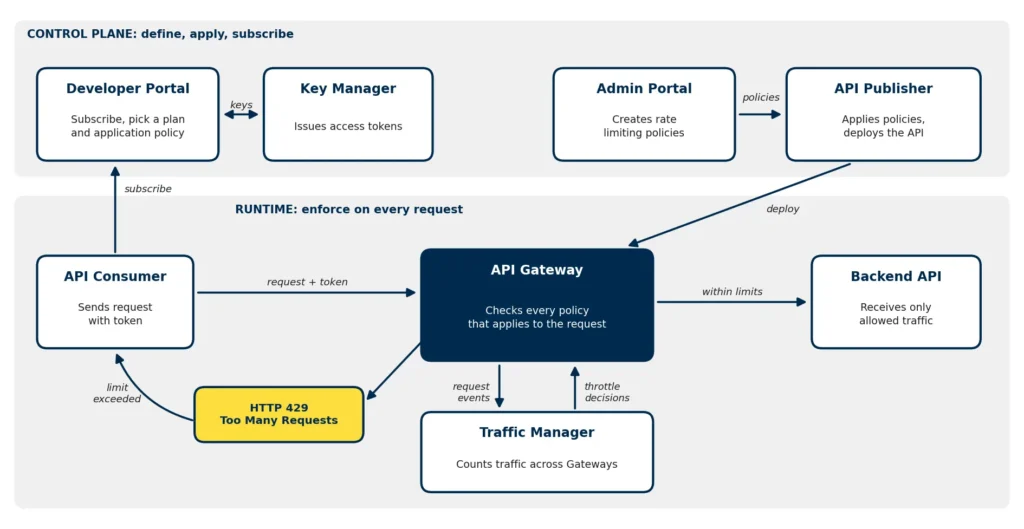
Figure 1: Where rate limiting policies are defined, applied and enforced in WSO2 API Manager.
You define policies in the Admin Portal and apply them in the Publisher, which deploys the API to the Gateway. Consumers subscribe through the Developer Portal and get tokens from the Key Manager. At runtime, the Gateway checks each request against every policy that applies. It also sends request events to the Traffic Manager, which counts traffic across all Gateways and tells them when a limit has been crossed.
That last step matters. Because the Traffic Manager evaluates traffic asynchronously, a cluster can let a few extra requests through before the throttle decision reaches every Gateway. WSO2’s own access control documentation notes that at least one request passes each time a blocking condition is enforced. Treat limits as near real-time controls and keep a margin below what your backend can actually handle.
Choose the Right Policy Type for Each Job
WSO2 API Manager offers several policy types, and each one answers a different question:
Policy type
Created in
Applied in
What it controls
Subscription policy (business plan)
Admin Portal
Publisher offers it; consumer picks it when subscribing
Requests from one application to one API. Supports burst control.
Application policy
Admin Portal
Developer Portal, when the application is created
Requests from one application across all the APIs it uses.
Advanced policy
Admin Portal
Publisher, at API or resource level
Total traffic to an API or resource from all consumers, with optional conditions on IP, header, query parameter or JWT claim.
Custom policy
Admin Portal (Siddhi query)
Applies globally
Rules that span APIs, such as a cap per user across the platform.
Deny policy
Admin Portal
Applies globally
Blocks an API, application, IP address or user outright.
A request has to pass every policy that applies to it, so the tightest one wins. A consumer on a generous subscription plan can still be throttled by an advanced policy that protects a fragile resource, which is exactly what you want.
Step by Step Configuring Rate Limiting in WSO2 API Manager
Step 1: Size the Limit from Backend Capacity
Start from what the backend can sustain, not from a round number. If a backend handles 50 requests per second at acceptable latency, an API-wide limit of about 40 per second (2,400 per minute) leaves headroom for retries, health checks and the counting margin described above.
Step 2: Create a Subscription Policy with Burst Control
In the Admin Portal (https://:9443/admin), open Rate Limiting Policies, then Subscription Policies, and add a policy. For example, a Standard plan of 1,000 requests per minute with burst control at 20 requests per second, and a Premium plan of 5,000 per minute with a higher burst limit.
Burst control stops a consumer from spending a whole minute’s quota in the first second. Without it, 1,000 requests per minute can still arrive as a single 1,000-request spike.
Step 3: Protect the API with an Advanced Policy
Still in the Admin Portal, under Advanced Policies, create a policy for the total traffic the API can accept from all consumers, such as 2,400 requests per minute. Add conditional groups when one group needs a different limit, for example a tighter limit for a specific IP range.
Switch On Header, Query and JWT Conditions
Conditions based on HTTP headers, query parameters and JWT claims are disabled by default. Enable the ones you need in deployment.toml (see the configuration catalog) before relying on them:
Open the API in the Publisher. In the subscription settings, select the business plans consumers can choose from. In the resource settings, set the advanced policy at API level, or per resource when one operation is far more expensive than the rest. Then deploy a new revision to the Gateway and publish the API.
Step 5: Subscribe with an Application Policy
In the Developer Portal, create an application and pick its application policy. For testing, choose the default 10PerMin policy so you can reach the limit in seconds. Subscribe the application to the API on the Standard plan and generate an access token.
Step 6: Test That the Limits Hold
for i in $(seq 1 12); do curl -s -o /dev/null -w "%{http_code}\n" \ -H "Authorization: Bearer $TOKEN" \ https://localhost:8243/orders/1.0.0/items done
The first ten requests should return 200 and the rest 429. With more than one Gateway, one or two extra requests may succeed before the limit applies. The 429 response body carries an error code that shows which policy fired:
900802: resource-level (advanced) limit
900803: application-level limit
900804: subscription-level limit
900806: custom policy
900807: subscription burst control
When support teams can see which policy fired, they can tell a consumer whether to upgrade a plan or fix a retry loop.
Rate Limiting Across a Distributed Gateway Deployment
In production you will usually run several Gateways, so point each one at a shared Traffic Manager deployed in a highly available setup. Three practices keep distributed limits predictable:
Leave headroom between the configured limit and true backend capacity, because enforcement is near real-time.
Monitor the link between Gateways and the Traffic Manager. If events or decisions stop flowing, limits stop being enforced consistently.
Load test with the same number of Gateways you run in production. A limit that holds on one node can behave differently on three.
Rate Limiting Is One Security Layer, Not the Whole Defense
Rate limits slow abuse down but do not stop it alone. Combine them with:
Deny policies to block an abusive IP, application or user immediately.
Gateway-only access to the backend, so nobody can bypass your limits.
Locked-down portals. 4.7 applies default-deny access control to the control plane; also keep the Admin Portal and Publisher off the public internet.
Protected encryption keys. 4.7 uses symmetric key encryption for sensitive data by default, and WSO2’s deployment guides require a 256-bit encryption key before first startup. Store it in a secrets manager and back it up.
Trusted certificates in place of the default keystores, with HTTPS end to end.
Monitor and Tune Rate Limits in Production
Rate limits are never finished. Track 429s per application and error code, plus backend latency and Gateway CPU. A steady rise in 900804 from one consumer usually means they have outgrown their plan, which is a commercial conversation rather than an incident. A sudden spike in 900807 usually points to a client retry loop, which is an incident.
Document your limits in the Developer Portal so consumers back off instead of hammering a throttled API, and export your policies with the API Controller (apictl) so they live in version control and move cleanly between environments.
Why do I get HTTP 429 before reaching my subscription limit?
Another policy fired first: an application, advanced, burst control or custom policy. The error code in the 429 response tells you which one.
Can WSO2 API Manager rate limit by IP address or JWT claim?
Yes. Advanced policies support conditions on IP address, HTTP headers, query parameters and JWT claims. Header, query parameter and JWT conditions must be enabled in deployment.toml first.
Are rate limits exact across multiple Gateways?
No. The Traffic Manager counts traffic asynchronously, so a few requests can pass before every Gateway applies the limit. Size limits with that margin in mind.