Migrating Off BizTalk: What Microsoft’s End-of-Life Announcement Means for Your Roadmap
Migrating Off BizTalk: What Microsoft’s End-of-Life Announcement Means for Your Roadmap
BizTalk Migration
November 4, 2026
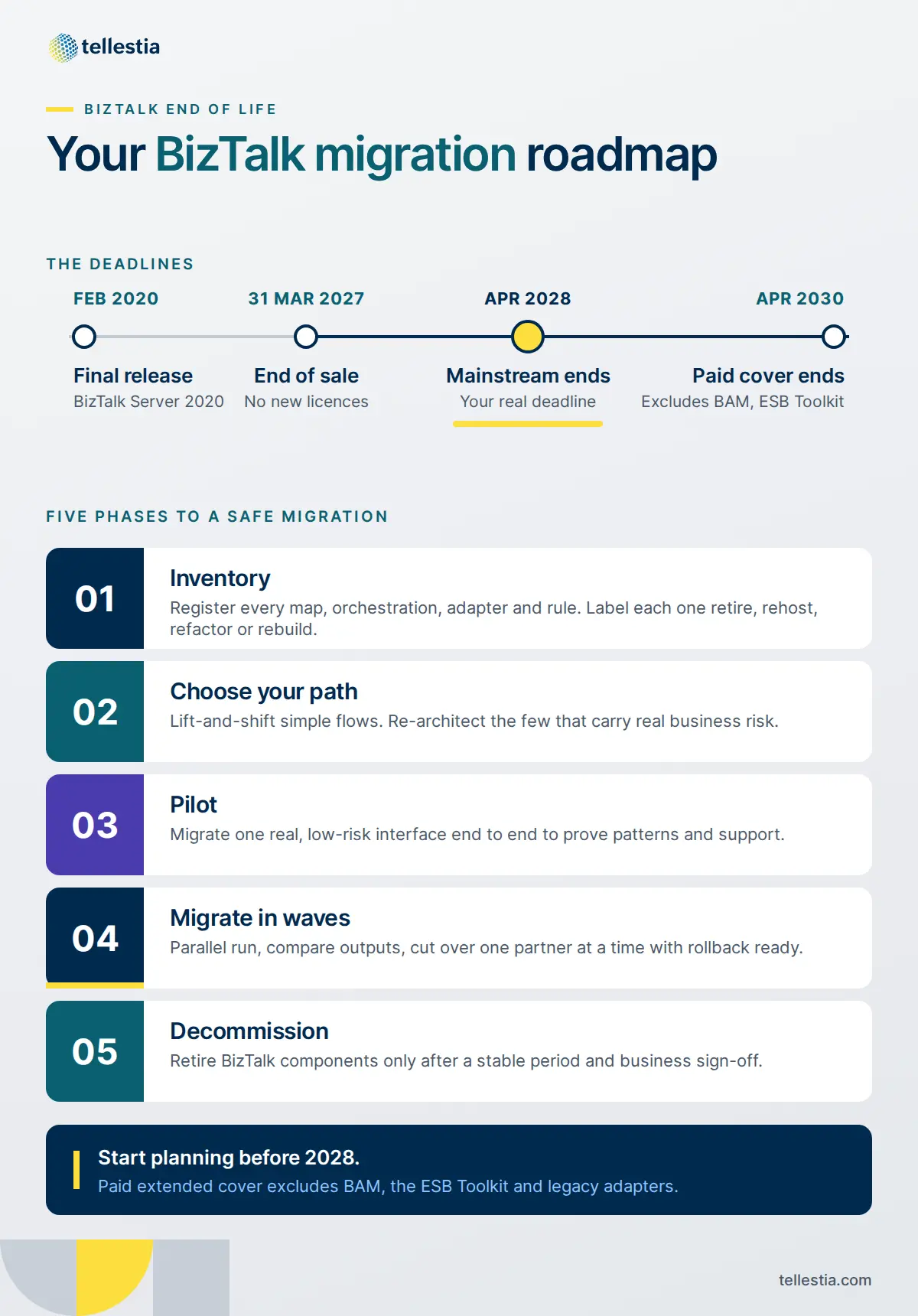
If you run a BizTalk Server estate, BizTalk migration has stopped being a someday project. Microsoft has confirmed that BizTalk Server 2020 is the last version it will ship, new sales are expected to stop on 31 March 2027, and mainstream support ends in April 2028. There is no next release coming to reset the clock
For most integration teams, the hard part isn’t deciding whether to move. It’s moving without breaking the order flows, EDI exchanges and finance interfaces that have run quietly on BizTalk for a decade. Many of those interfaces were built by people who have since moved on, documented lightly, and patched in place more times than anyone can count.
This guide is for the integration lead or architect who owns that estate. We’ll walk through the verified lifecycle dates, how to inventory what you actually run, how to choose between lift-and-shift and re-architecture, and how to stage the cutover with a rollback plan and a hybrid period that keeps production safe. A BizTalk migration checklist at the end turns it all into a working plan.
BizTalk End of Life: The Dates That Shape Your Roadmap
BizTalk Server 2020 follows Microsoft's Fixed Lifecycle Policy, and the milestones below come straight from Microsoft's own lifecycle and migration pages.
Milestone
Date
What it means for you
BizTalk Server 2020 released
February 2020
Final version of the product. No successor release is planned.
End of sale (expected)
31 March 2027
You can't buy new BizTalk licenses after this date, which matters if you need to add capacity or environments.
End of mainstream support
April 2028
No new fixes or enhancements after this point unless you buy extended coverage.
Paid extended-mainstream support
13 April 2028 to 10 April 2030
Optional, paid and limited to eligible customers. Microsoft positions it as temporary migration cover, not a long-term home.
The last row is the one teams most often misread. Extended support to 2030 is not a blanket safety net. Microsoft expects it to exclude several capabilities, including Business Activity Monitoring (BAM), the ESB Toolkit, industry accelerators, legacy enterprise adapters, BizTalk-specific ALM tooling, and Visual Studio versions newer than 2022. If your estate leans on any of these, your real deadline is April 2028, not 2030.
Working back from those dates, the window is tighter than it looks. A mid-sized estate with a few hundred interfaces typically needs time for discovery, design, a pilot, several migration waves and a parallel-run period for each. Teams that start planning in 2026 can migrate on their own schedule. Teams that start in 2028 will be migrating under pressure, often while paying for extended support at the same time.
Inventory First: Find Every Map, Orchestration and Adapter You Run
Every successful BizTalk migration starts with an honest inventory, because you can't estimate, sequence or de-risk what you haven't counted. The BizTalk Administration Console tells you what's deployed. It doesn't tell you what still matters, who depends on it, or what breaks if it stops.
Build one register per BizTalk application and capture at least the following.
Artifact
What to record
Why it matters
Orchestrations
Long-running or short-lived, correlation sets, compensation logic, convoys
Long-running and convoy patterns need the most redesign effort
Maps and schemas
XSLT maps, custom and scripting functoids, flat file and EDI schemas
Plain maps often carry over; custom functoids usually need rework
Pipelines
Custom pipeline components, disassemblers, encryption and signing steps
This is where routing logic and partner endpoints actually live
Business rules
Business Rules Engine policies and vocabularies
Some can be reused, others need refactoring
BAM and ESB Toolkit
Activities, views, itineraries
Expected to be excluded from extended support, so plan these early
Custom code and config
Helper assemblies, SSO config store entries, certificates
Secrets and certificates are a frequent cutover blocker
Then add the runtime picture: message volumes, peak windows, payload sizes, SLAs, the business owner, and every upstream and downstream system. Tracking data and host instance metrics will show you which interfaces are busy and which have been silent for months.
With that register in hand, give every interface one of four labels:
Retire: no traffic, no owner, or replaced by another system. It's common to find a meaningful share of an estate in this bucket, and each one removed is one you never have to migrate.
Rehost: simple, stable flows that can move with minimal change.
Refactor: sound logic that needs adapting to the new platform's patterns.
Rebuild: brittle or business-critical flows where redesign is cheaper than translation.
Microsoft's Azure Logic Apps Migration Agent can help with discovery and analysis if Azure is your likely target, but treat any automated output as a first draft. The business context, ownership and risk ratings still have to come from your team.
Lift-and-Shift or Re-Architect? Picking the Right BizTalk Migration Path
Most estates end up using more than one approach, so the real question is which approach fits each group of interfaces. Here's how the three main paths compare.
Approach
Best when
Watch out for
Stay and stabilise on BizTalk 2020
You need time to plan and older versions are your bigger risk
It buys time to 2028 at best. It is not a destination.
Lift-and-shift to a modern platform
Interfaces are stable, well understood and mostly maps, schemas and simple routing
You can carry old design debt into a new platform and pay for it twice
Re-architect
Flows are business-critical, brittle, or built around MessageBox publish-subscribe and long-running orchestrations
Takes longer and needs strong business involvement to confirm requirements
A practical rule: lift-and-shift the many simple interfaces to build momentum, and re-architect the few that carry real business risk. Translating a fragile orchestration line by line usually just moves the fragility.
BizTalk Alternatives Worth Evaluating
Microsoft names Azure Logic Apps Standard as BizTalk's successor, and for Microsoft-centric teams it's the natural first look. It isn't the only credible option, though. Your choice should follow your hosting, skills and integration strategy, not just your current vendor.
Azure Logic Apps Standard (with Azure Integration Services): the closest fit for .NET teams already on Azure, with reuse paths for many BizTalk schemas, maps and rules.
Boomi: a low-code iPaaS with strong EDI/B2B and master data capabilities, well suited to hybrid estates and partner-heavy flows.
MuleSoft: an API-led platform that suits organisations building a reusable API layer alongside their integrations.
WSO2: open-source integration, API management and identity, attractive where on-premises control or licence flexibility matters.
Workato: enterprise automation that brings business teams closer to integration and workflow work.
Score each option against the same criteria: where workloads must run (cloud, on-premises or both), EDI and B2B depth, the connectors your adapters map to, your team's skills, the licensing model, and how well the platform supports your wider API, data and automation roadmap. A BizTalk migration is a rare chance to fix the integration foundation, not just replace it.
BizTalk to Azure Logic Apps: How Your Components Translate
If Azure is your target, plan on Logic Apps Standard rather than Consumption, since Microsoft's BizTalk migration capabilities only support Standard workflows. The two platforms are built differently, so think in terms of equivalents, not one-to-one copies.
BizTalk component
Logic Apps Standard equivalent
Typical effort
Orchestrations
Stateful or stateless workflows
Refactor the process logic
MessageBox publish-subscribe
Azure Service Bus topics (or RabbitMQ, Kafka)
Redesign as a separate messaging layer
Schemas and maps
XSLT maps, Liquid templates, Data Mapper
Reuse where compatible, then validate
Pipelines and helper code
Workflow actions, .NET local functions, custom connectors
Reuse or refactor
Business Rules Engine
Azure Logic Apps Rules Engine
Reuse supported policies
EDI and B2B
Integration accounts, B2B connectors
Reassess partners, agreements and certificates
Adapters
Built-in, managed or custom connectors
Confirm availability and throughput
BAM and tracking
Business Process Tracking, Azure Monitor, Application Insights
Redesign monitoring and support model
A few design shifts catch teams out:
Don't rebuild the MessageBox inside a workflow. Use a proper message broker for publish-subscribe routing.
Design for at-least-once delivery. Build in idempotency and duplicate detection so retries and resubmits don't create double orders or payments.
Check message size limits early. Large EDI batches or files may need chunking or a claim-check pattern.
Keep workflow-specific code close to the workflow. .NET local functions can host helper logic without spinning up a separate Functions resource.
Plan BAM replacement as its own workstream, especially for hybrid deployments where Azure Business Process Tracking isn't supported.
Staging and Rollback: Cut Over Without Breaking Production
The fear of breaking production is legitimate, and the answer is to never cut over anything you can't reverse in minutes. Big-bang migrations are where BizTalk projects go wrong. Waves, parallel runs and pre-agreed rollback triggers are where they go right.
Start with a pilot interface. Pick something real but low-risk, with moderate volume and a cooperative business owner. Use it to prove your patterns, pipelines, monitoring and support handover.
Group the rest into waves. Sequence by risk and dependency, not by application name. Interfaces that share a partner, a schema or a downstream system usually move together.
Run in parallel before you switch. Feed the same inputs to BizTalk and the new platform, keep only one of them writing to target systems, and compare outputs message by message. Move on only when the results match over a full business cycle, including month-end if finance flows are involved.
Cut over one interface or partner at a time. Switch routing at the edge: an endpoint, a queue subscription, a DNS entry or an API gateway rule. That keeps the switch quick in both directions.
Keep BizTalk ready to take traffic back. Disable ports rather than deleting them, keep versioned binding exports, and leave certificates and SSO entries in place until the wave is signed off.
Agree rollback triggers in advance. Define the error rate, latency or reconciliation gap that forces a rollback, who makes the call, and how in-flight messages are reconciled so nothing is lost or processed twice.
Decommission deliberately. Retire BizTalk components only after a stable period on the new platform and a sign-off from the business owner.
This takes longer on paper than a single weekend cutover. In practice it's faster, because you avoid the incident reviews, emergency fixes and loss of business confidence that follow a failed big-bang go-live.
Running Hybrid: Keeping BizTalk and Your New Platform Side by Side
For most estates, BizTalk and the new platform will run together for months, so design the coexistence period on purpose rather than letting it happen by accident. These are the patterns that work well.
Bridge through a shared message layer. Put a broker such as Azure Service Bus between the two platforms. BizTalk can publish to it and the new platform can subscribe, which lets you move consumers one at a time without touching the publisher.
Front interfaces with an API gateway. Route callers through a gateway so each interface can switch from BizTalk to the new implementation with a routing change. This is the classic strangler pattern, and it also gives you a cleaner API layer for the future.
Keep on-premises workloads on-premises. If data residency, latency or regulation means some flows can't move to the cloud, Logic Apps Standard can run on customer-managed infrastructure through its hybrid deployment option on Azure Arc-enabled Kubernetes. Note that it's partially connected rather than air-gapped, needs outbound connectivity to Azure, and doesn't support every cloud feature.
Reach on-premises systems from the cloud securely. Use VPN, ExpressRoute or a data gateway so cloud workflows can call the same SQL Server, SAP or file shares that BizTalk does today.
Monitor both platforms in one view. During coexistence a single transaction may cross both runtimes. Your support team needs end-to-end tracking and alerting across the two, or incidents will bounce between teams.
Budget for the overlap as well. You'll pay for BizTalk, SQL Server and Windows licences, the new platform's capacity, and the people supporting both for the length of the transition. A shorter, well-planned hybrid period is almost always cheaper than a long, unplanned one.
Your BizTalk Migration Checklist
Use this BizTalk migration checklist to turn the steps above into a plan your team and leadership can sign off.
Plan
Confirm your BizTalk versions and the support dates that apply to each
Identify any dependency on BAM, the ESB Toolkit, accelerators or legacy adapters
Set a target completion date well ahead of April 2028
Secure budget for the parallel-run period
Discover
Register every orchestration, map, schema, pipeline, adapter, port and rule
Capture volumes, SLAs, owners and dependencies for each interface
Label each interface: retire, rehost, refactor or rebuild
Design
Shortlist target platforms and score them against the same criteria
Define your messaging, API, security and monitoring patterns
Decide which workloads run in the cloud and which stay on-premises
Build and test
Migrate a pilot interface end to end
Set up CI/CD, infrastructure as code and environment configuration
Run parallel tests and reconcile outputs across a full business cycle
Cut over
Move in waves, one interface or partner at a time
Agree rollback triggers, owners and in-flight message handling
Keep BizTalk ready to take traffic back until each wave is signed off
Close out
Decommission BizTalk components after a stable period
Hand over runbooks and monitoring to the support team
Review licences and infrastructure you no longer need
Start Your BizTalk Migration on Your Terms
BizTalk end of life is a fixed date, but how you get there is still your call. The teams that come through it well are the ones that inventory early, choose the right path for each interface, and treat rollback and coexistence as part of the design rather than an afterthought.
Tellestia has delivered more than 100 data and integration projects over six-plus years, with hands-on expertise across Azure, Boomi, MuleSoft, WSO2 and Workato. That platform range means we can recommend the target that fits your estate, not the one we happen to sell, and then help you migrate to it in safe, staged waves.
Explore our Legacy Middleware Migration services to see how we take integration estates from BizTalk and other legacy middleware to a modern platform, or talk to our team about an assessment of your BizTalk estate.
A. Subramaniam
Chief Technology Officer
Share Blog Via:
BizTalk modernization
BizTalk Server Migration
BizTalk to iPaaS
Microsoft BizTalk
The AI-Ready Data Checklist: A Practical AI Data Readiness Assessment